


Mainframe programmers are problem-solvers. In today’s large, complex data centers, we’re often faced with ad-hoc questions from management – questions that echo the old National Enquirer slogan, “Inquiring Minds Want to Know.” And management usually wants answers right now:
- What does this dataset look like?
- What are its characteristics?
- How much space does it occupy?
- When was it created and last referenced?
For a single dataset, this sort of information can usually be obtained with a glance at an ISPF panel or two. For a list of datasets, though, it’s not so simple. We need to obtain detailed data for each dataset, possibly keep track of running totals, and provide a report.
Why REXX and LISTDSI Are a Natural Fit
The REXX programming language is ideal for solving these sorts of problems, and the REXX LISTDSI function allows the programmer to easily obtain all sorts of information about a z/OS dataset.
LISTDSI returns data in well over 30 variables that can tell us everything from the dataset’s organization and record length to its encryption key label, number of directory blocks, and SMS class names.
When used in a loop to read an input list of dataset names, LISTDSI variables like SYSALLOC and SYSUSED can be accumulated to keep a running total of disk space. Other variables, like SYSEXPIRE and SYSUPDATED, can be used to identify potential problems – for example, disk datasets that have expired or have been changed but not backed up.
Running LISTDSI in TSO or Batch
LISTDSI is a TSO/E external function and must run in a TSO address space. This is usually not a problem, however, as it’s possible to run TSO in batch simply by specifying PGM=IKJEFT01.
The simplest format of LISTDSI is simply a REXX function specifying the dataset name, for example:
x = LISTDSI(the-dataset)
where ‘the-dataset’ is a variable containing the single dataset name for which we want information.
The variable ‘x’, the function code, is necessary because LISTDSI must be called as a REXX function. A zero function code indicates success, 4 indicates partial success (some but not all data returned), and 16 indicates a failure.
The actual dataset information is placed in numerous predefined REXX variables, all of which begin with the characters ‘SYS’ – such as SYSVOLUME, SYSDSORG, SYSRECFM, and so on. The contents of these variables can then be written out using REXX ‘SAY’ statements or used for other processing in the exec.
ProductSyncsort™ Storage Management
Take control of IBM Z storage with automated, reliable, and cost-optimized management.
Optional Parameters That Return Even More Detail
By default, LISTDSI simply obtains information about the dataset from the catalog and the volume VTOC. However, several additional parameters can follow the dataset name in the LISTDSI call to return further information, including directory block counts and SMS class names.
The most important of these parameters are:
- RECALL/NORECALL, which controls whether DFSMShsm is allowed to recall datasets from archive during LISTDSI processing
- SMSINFO/NOSMSINFO, which returns the class names for SMS-managed datasets.
Known Limitations to Be Aware Of
There are, unfortunately, still a few limitations to LISTDSI processing.
No information is returned for tape or Unix Systems Services files, and generation dataset names must be fully specified (no relative GDGs). For VSAM datasets, only a limited subset of information is returned (SYSVOLUME, SYSUNIT, and SYSDSORG).
It’s possible these drawbacks will be removed in a future z/OS release. Even with these limitations, however, LISTDSI is an extraordinarily simple way to get detailed information about z/OS datasets.
That information is returned in easy-to-use REXX variables, and provides a quick way for the programmer – facing a sudden demand for data – to provide what’s needed, when it’s needed, to satisfy those inquiring managerial minds.
Example: Displaying Key LISTDSI Variables
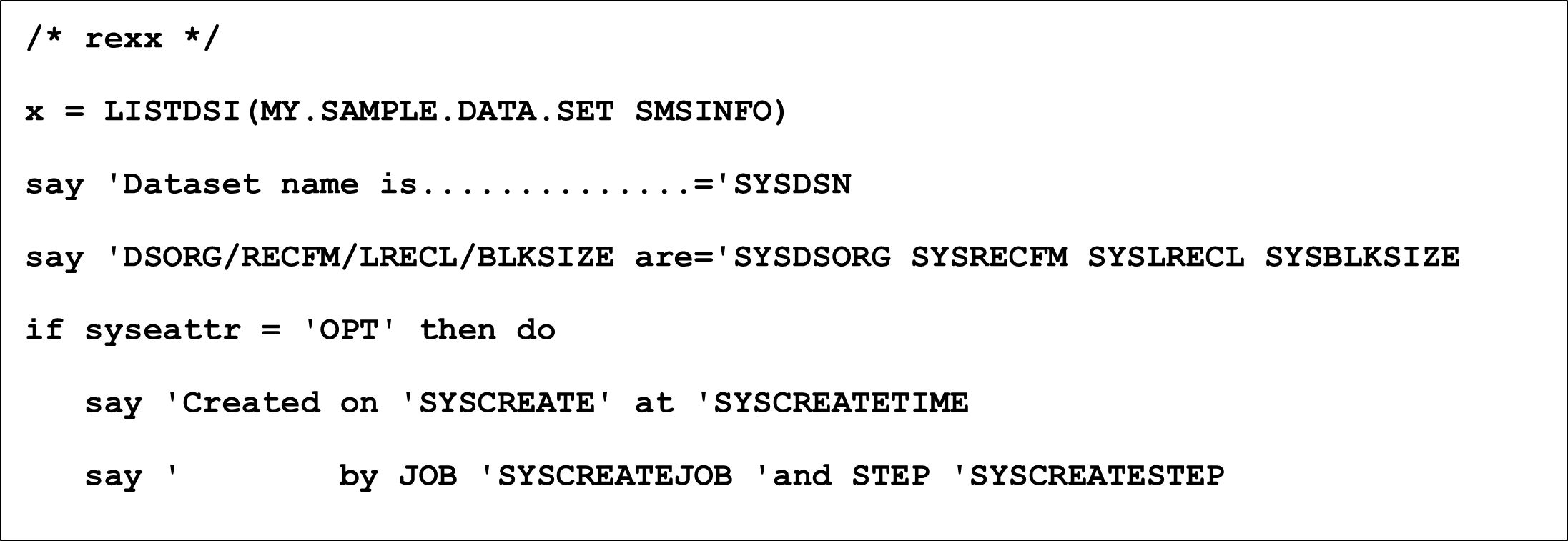
The figure below shows a simple REXX exec that displays some of the more interesting LISTDSI variables for a specified dataset name, including the date and time the dataset was created:
Turning LISTDSI Output into Operational Insight
LISTDSI gives mainframe teams a fast, flexible way to extract critical dataset details using familiar REXX constructs – making it easier to answer questions, spot issues, and keep storage information flowing when it matters most.
To go even further and gain deeper visibility, automation, and control across your storage environment, learn more about how Syncsort™ Storage Management helps simplify and optimize z/OS storage operations.