

Start building in minutes
AI Studio gives you a curated collection of working apps, agents, skills, and more. Every asset is ready-made, tested, and pre-connected via MCP. The groundwork is already laid.
See how easy it is to get started with Precisely AI Studio.
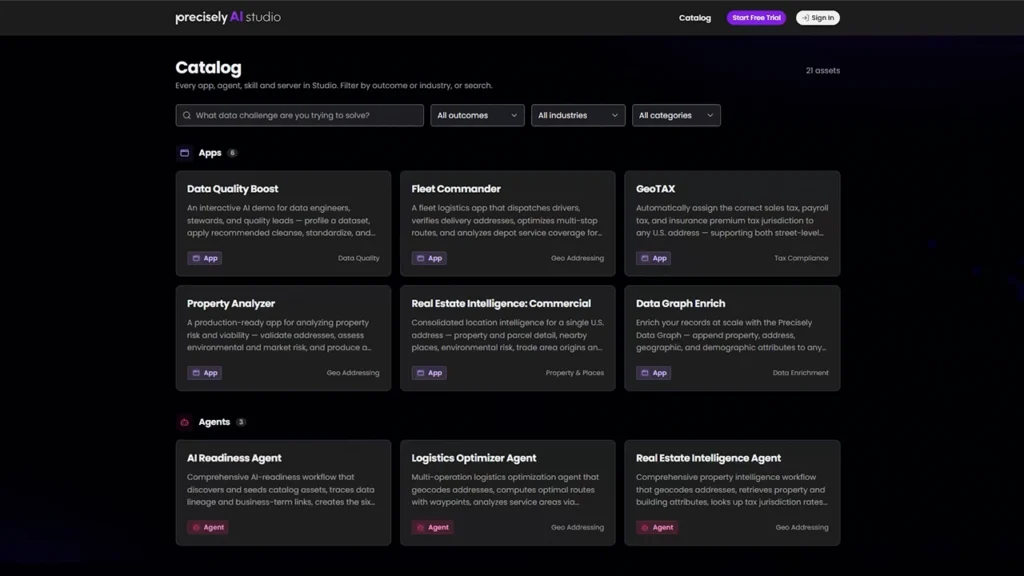
The Precisely AI Studio catalog
Jump in with proven AI assets
Precisely AI Studio is a collection of ready-made assets organized by industry and outcome so you can find what’s relevant to your problem. Some improve your data. Others build on it.

Apps
Pre-built applications that deliver a full industry outcome

Agents
Task-focused agents you can point at your own records and run

Skills
Building blocks you can download and drop into your own stack
Three steps to a working solution

Explore the collection
Filter by industry or outcome, then select an asset that maps to your problem. No account needed to look.

Try it in AI Studio
Sign in and run assets against Precisely sample data and prompts. See exactly how each one behaves before going further.

Use it on your stack
Download the agents and skills you want and run them in your own environment with a Precisely MCP connection.
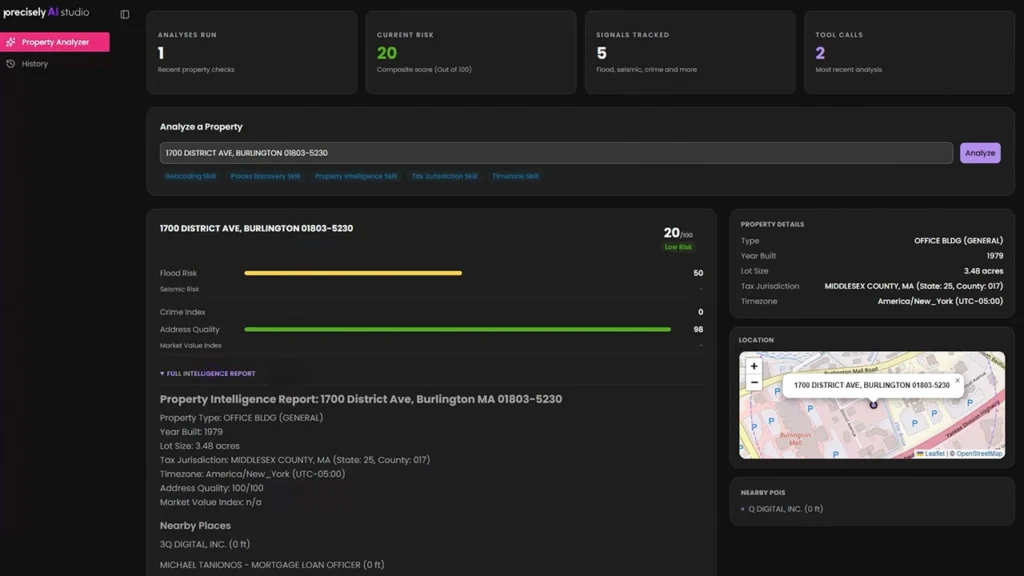
Property Analyzer app
Grounded in data you can trust
Every asset arrives built on Precisely proprietary datasets and embedded location intelligence — and ready to improve your data with Precisely data management capabilities.
No stack lock-in
Download agents and skills and compose them on whatever model or tooling you already use. Precisely stays neutral across clouds, models, and your entire data estate.
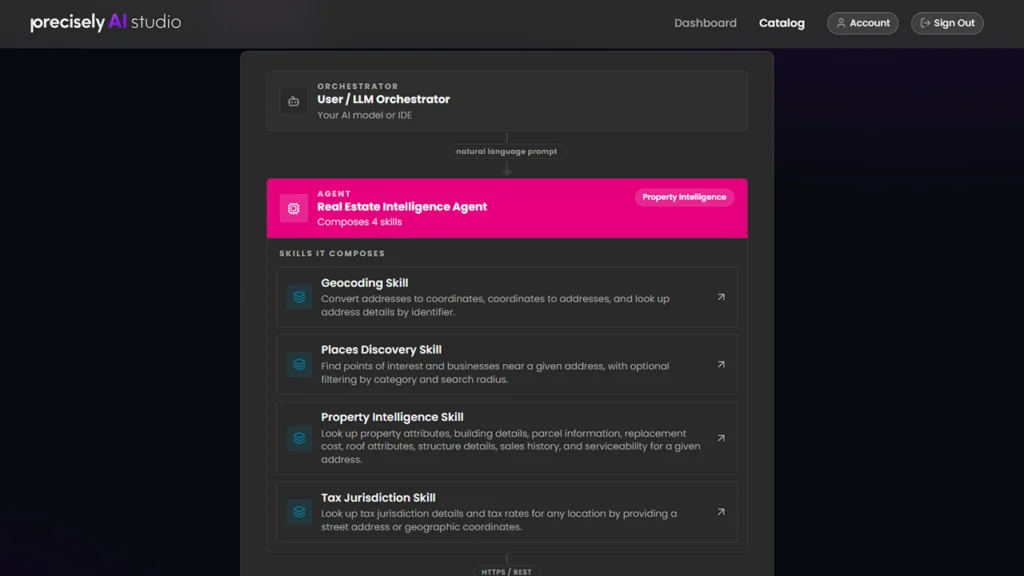
The User/LLM Orchestrator
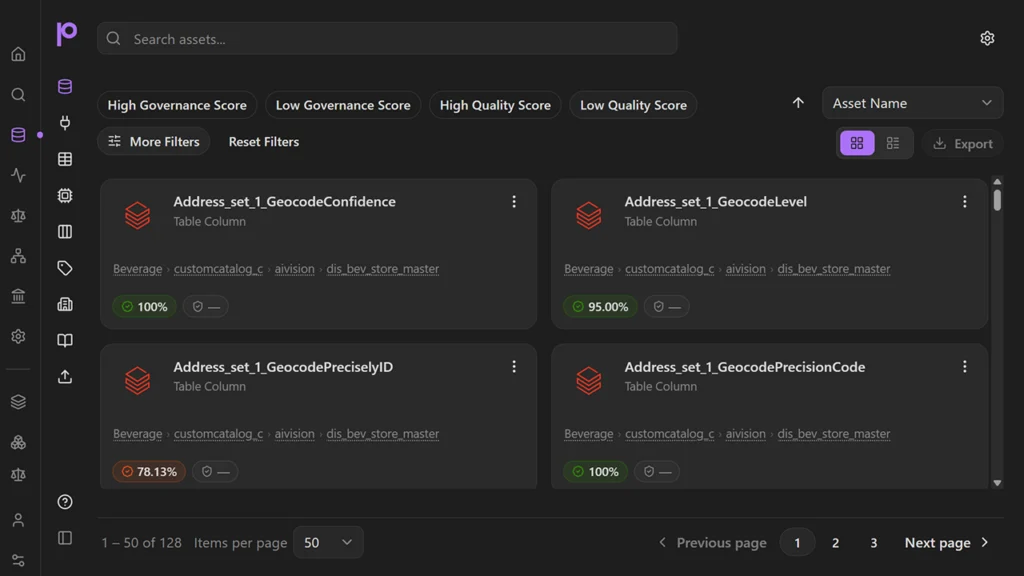
Precisely Platform Catalog Assets
Built on the Precisely Platform
Every asset in AI Studio runs on live Precisely Platform capabilities, so every solution you discover is also a window into what the Platform can do for your data and your business.
Frequently Asked Questions
What is Precisely AI Studio?
Precisely AI Studio is a growing collection of ready-made AI assets, including agents with sample prompts, apps, and skills. Explore assets by industry, category, or outcome, run them on real data in minutes, and connect them to the AI models and applications you already use. It’s the easy way to build data solutions fast.
How do I get started with AI Studio? And how long is the trial?
Sign up for a free trial at precisely.ai. This creates a new AI Studio free trial workspace with 30 days of full access. If you’re an existing Precisely customer, set the new trial workspace as your default within your existing Data Integrity Suite workspace to explore and test AI Studio without drawing against your purchased usage allowances or entitlements.
The trial includes credit and transaction allowances that you can track in AI Studio. If you use all your credits and transactions before the 30 days are up, the trial will end at that point, and you can talk to Sales about converting to a production environment.
What can I build with AI Studio?
Precisely AI Studio provides a growing collection of ready-made agents, apps, and skills that help you move from idea to working example in minutes. These prebuilt assets help you access Precisely capabilities. Use them individually or together to create automated workflows, AI applications, or agents that solve real business challenges.
How does AI Studio fit into my existing AI environment?
AI Studio works out of the box with no configuration needed — just sign up and start exploring. When you’re ready to go further, connect AI Studio assets to the models, tools, and applications your organization already uses through the Precisely-hosted MCP server.
Can I invite my team to my AI Studio workspace?
Yes. In AI Studio, go to Account in the upper right corner, then select Team from the options along the left-hand side. From there, you can invite colleagues and manage workspace members.
What datasets does AI Studio support?
AI Studio is available globally. Dataset availability and geographic coverage vary by capability. Coverage details are provided within individual assets so you can understand availability before you begin.
What should I consider before connecting AI Studio assets to production environments?
AI Studio assets are designed to support real-world use cases, but organizations should carefully evaluate permissions, integrations, governance requirements, and potential business impact before connecting them to production systems. Depending on the implementation, AI-powered workflows may interact with external applications, business processes, and production data. As a best practice, you should begin with test or non-production data whenever possible and validate workflows before using them more broadly. Organizations should also review security, governance, and data management requirements before using assets within production environments.
Is my data secure when I run assets in AI Studio?
AI Studio runs on sample data, so you don’t need to bring your own to get started. Two apps, Data Graph Enrich and Data Quality Boost, let you upload data if you choose to, but that’s entirely up to you. Precisely is responsible for security during the trial, and any data is removed when the trial ends. Even so, we recommend you don’t upload sensitive or production data.
How do I upgrade my trial to a production environment?
When you’re ready to upgrade, go to your account in the upper right corner of AI Studio. Under the Plan section, you’ll see your trial status and how much time you have remaining, along with an Upgrade button. Clicking that takes you to a form where you can get in touch with Sales to set up a production workspace.
I need additional support beyond these questions. Where can I reach out?
There are two places to go depending on what you need. For documentation, guidance, and help with specific capabilities, visit the AI Studio page on the Precisely Help Center. If you want to ask questions, share what you’ve built, or see how others are using AI Studio, join the Precisely AI Studio Community Forum — it’s where the AI Studio builder community lives.