


Key Takeaways
- Automate Evolve Cloud Essentials eliminates the infrastructure overhead of on-premises Studio Manager while delivering the same enterprise-grade automation governance capabilities.
- As SAP automation spreads across business teams, centralized automation governance — script approvals, audit logs, license management, and server-side scheduling — becomes as critical to program health as the automation itself.
- Compatibility across SAP GUI, Fiori, and HTML interfaces means automation assets built today are protected through ECC-to-S/4HANA transitions.
When Precisely Automate Studio first gave business teams the ability to manage SAP data directly from Excel, the reaction was predictable: adoption spread fast. Finance teams used it. Operations teams used it. Supply chain teams built scripts, scheduled jobs, and automated processes they’d been handling manually for years.
Then came the governance question.
According to ASUG and Precisely research, 62% of SAP users cite business process complexity as their top automation challenge, and 57% of organizations are using automation across their SAP environments. As that adoption spreads across teams, regions, and departments, a new problem emerges: visibility.
- Who’s running which scripts?
- When do jobs execute?
- What data is being posted to SAP — and is any of it auditable?
That automation governance gap is exactly what Automate Evolve Cloud Essentials is built to close. And the fact that it does so as a fully managed, cloud-native SaaS offering makes it meaningful news for anyone managing SAP automation at scale.
What Problem Does SAP Automation Governance Solve? And Why Does it Matter for SAP Teams?
Automate Studio is highly effective at giving business users the ability to manage SAP data without opening an IT ticket. For repetitive, high-volume processes like master data updates, journal entries, purchase order creation, and inventory adjustments, it removes friction and gives the people closest to the work the ability to act directly.
But as Studio adoption scales beyond a small group of power users, the dynamics shift. What started as a few trusted scripts running on a handful of laptops becomes a distributed automation program operating across teams and time zones. That creates a set of risks that productivity alone can’t address.
The result is automation that scales risk alongside productivity. For IT and SAP Center of Excellence (CoE) teams, this is the governance gap: the distance between the speed at which business teams want to move and the controls the organization needs to be in place.
| The Governance Gap | What Automate Evolve Cloud Essentials Provides |
| No centralized visibility into who is running what, when, or with what permissions | Centralized license management with full user and permissions visibility |
| No script approval process to validate automations before they touch production SAP data | Script approval workflows — automations are reviewed and sanctioned before deployment |
| No reliable job scheduling beyond someone’s local machine being on at the right time | Server-side job scheduling for reliable, unattended execution of critical SAP processes |
| No audit trail defensible to compliance or security teams | Comprehensive, immutable audit logs that support compliance, accountability, and transparency |
The governance gap: common risks in unmanaged SAP automation programs, and what Automate Evolve Cloud Essentials provides in response.
Governed SAP automation programs that combine productivity with oversight are better positioned to scale, satisfy compliance requirements, and survive organizational change.
Why Does SaaS Delivery Matter for SAP Automation?
The “Cloud Essentials” in the product name carries real weight. Automate Evolve Cloud Essentials is the first pure SaaS offering in the Precisely Automate portfolio, and that distinction matters in ways that go beyond deployment preference.
With no servers to provision and no upgrade projects to manage, Automate Evolve Cloud Essentials removes the operational overhead that has made on-premises governance a barrier for many organizations. Precisely handles the infrastructure, and customers stay on the latest release automatically.
That alignment with cloud-first IT strategy is meaningful for a specific group of customers: the SAP transformation leaders managing S/4HANA migrations and RISE with SAP journeys who have already made a strategic commitment to reducing their on-premises footprint. For those organizations, a SaaS-delivered governance layer for SAP automation is a natural fit; it supports modernization goals rather than working against them.
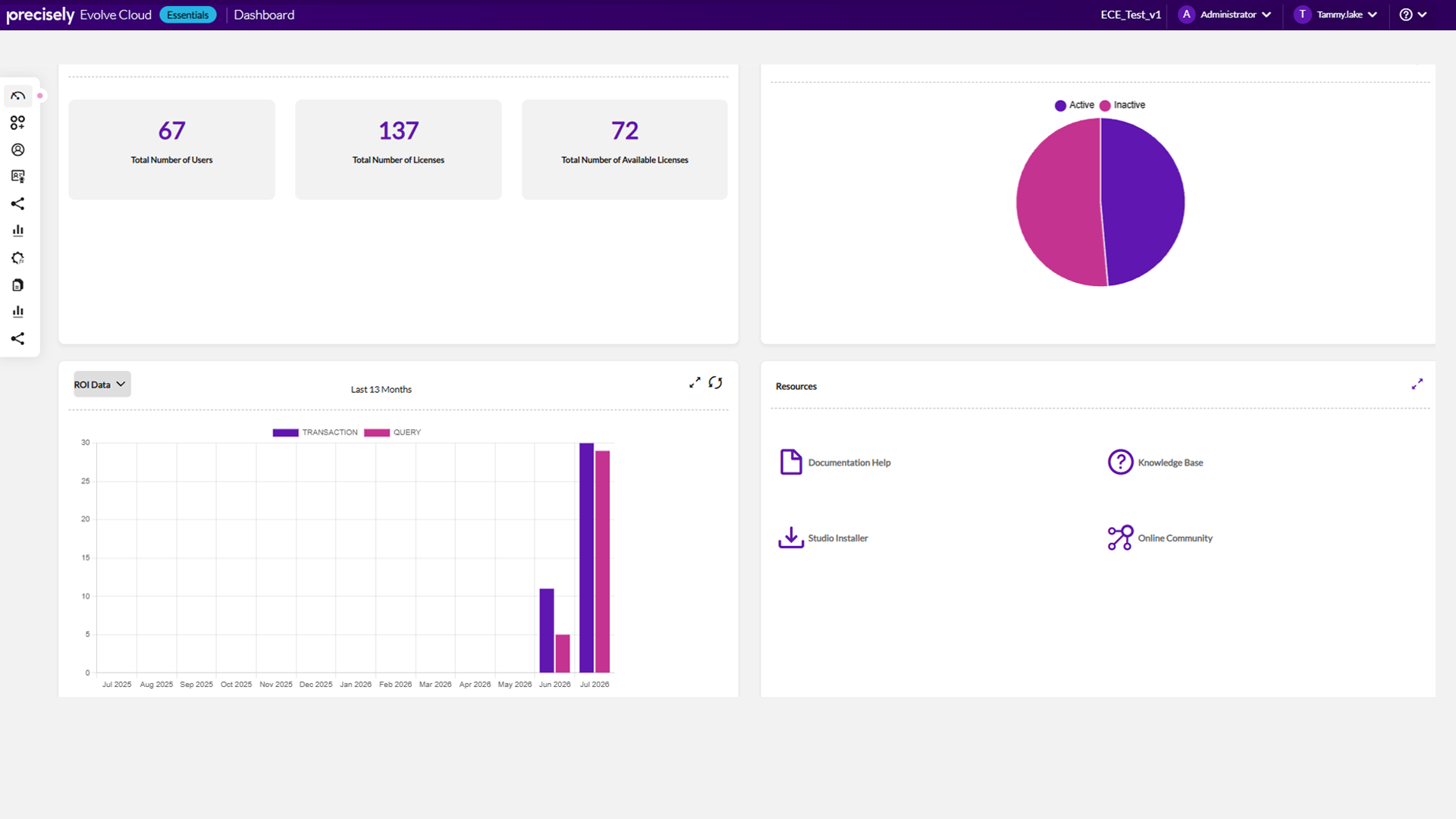
The Automate Evolve Cloud Essentials Dashboard: user counts, license management, and ROI data in one view, so administrators always know the state of their automation program.
How Does Automate Evolve Cloud Essentials Support Compliance and Regulated Industries?
For many organizations, governance in SAP environments is now a regulatory requirement. The specific demands vary by industry, but the underlying need is consistent: a defensible record of what automation ran, when, who authorized it, and what data it touched.
| Industry | Regulatory Requirement | Automate Evolve Cloud Essentials Capability |
| Life Sciences & Pharma |
FDA and GxP compliance demands complete auditability of every SAP data transaction |
Immutable audit logs capture a complete, unalterable record of all automation activity |
| Financial Services | SOX controls and close-cycle automation require a clear record of what ran, when, and who authorized it | Script approval workflows and audit trails document every change with date, time, and approver |
| Energy & Utilities | Regulatory reporting obligations create sustained demand for traceable, controlled SAP data operations | Role-based access controls and server-side scheduling ensure governed, repeatable execution |
| Manufacturing & Chemicals | High-volume data operations and hazardous substance compliance require both reliability and auditability | Server-side scheduling with comprehensive logs supports defensible operational records |
Industry compliance requirements and the Automate Evolve Cloud Essentials capabilities that address them.
The practical implication? Compliance teams and external auditors can be handed an audit trail without anyone having to reconstruct it manually. That’s the difference between a governance program that satisfies a checkbox and one that reduces organizational risk.
The table above covers the regulated industry specifics, but the same principle applies broadly: any organization running high-volume SAP data operations across multiple teams benefits from the reliability and traceability that server-side scheduling and audit logs provide.
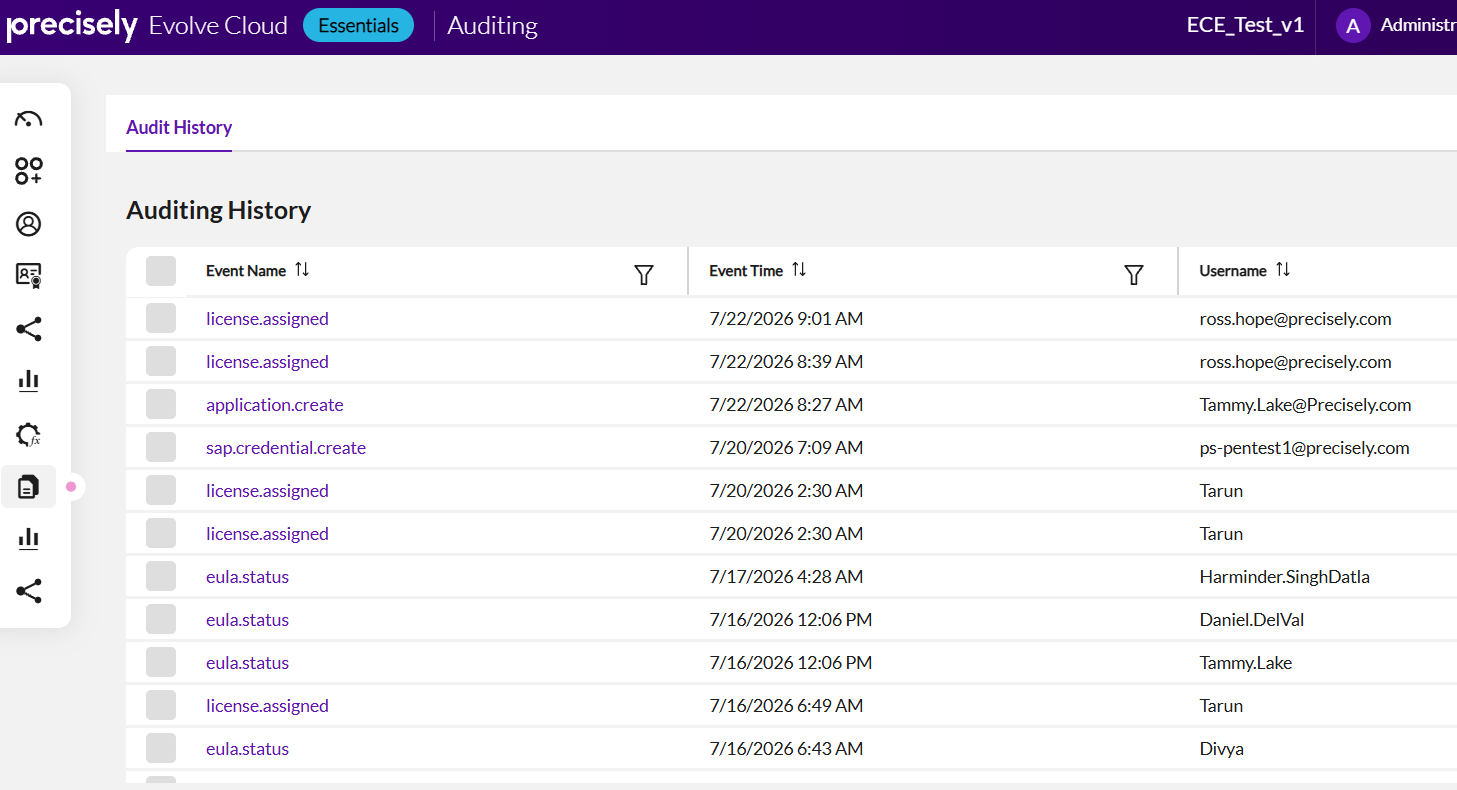
The Auditing History view in Automate Evolve Cloud Essentials automatically logs every event, including license assignments, application activity, and credential changes, with timestamps and usernames, giving compliance teams a complete, ready-to-share audit trail.
What Does This Announcement Mean for Existing Precisely Automate Customers?
ASUG and Precisely research found that 59% of organizations are fully or partially live on S/4HANA, and 75% say no-code/low-code capability is important when evaluating SAP automation tools.
Those two data points tell a story about where the SAP automation market is heading: more organizations are in active migration, and they’re looking for automation tools that meet them where business users actually are, not where IT wants them to be.
If you’re an existing Automate Studio customer, Automate Evolve Cloud Essentials represents a governance upgrade path that doesn’t require you to start over.
Existing Studio Manager customers can migrate to the cloud-delivered offering without losing any functionality. The full feature set of Studio Manager — centralized governance, server-side scheduling, audit logs, and license management — is included in a fully managed SaaS package.
For new customers, it means enterprise-grade SAP automation governance is now accessible without an on-premises deployment. The infrastructure barrier that may have previously made Studio Manager a longer conversation is gone.
Unlock SAP Automation with Scalable Governance
Automate Evolve Cloud Essentials fits into a clear portfolio story. Each layer has a distinct role, and together they give organizations a path to grow SAP automation programs in stages, starting where the ROI is most visible, and expanding governance and orchestration as adoption matures.
|
Automate Studio Creates the automation |
Automate Evolve Cloud Essentials Governs and scales it |
Automate Evolve Orchestrates complex workflows |
| Business teams build and run SAP automations directly from Excel — no IT ticket required | Centralized license management, script approvals, server-side scheduling, and audit trails — delivered as SaaS | Handles multi-step, cross-system workflow orchestration for organizations with advanced automation needs |
The Precisely Automate platform: three layers, one coherent SAP automation story.
Compatibility across SAP GUI, Fiori, and HTML interfaces helps to build automation assets today that are ready for tomorrow’s SAP environment. For transformation leaders who have already invested significantly in Studio-based automation, that continuity is directly relevant to migration planning.
The challenge that Automate Evolve Cloud Essentials addresses isn’t new, but rather the predictable consequence of successful automation. When Studio adoption grows and business teams gain real productivity, the question of how to govern that activity at scale becomes unavoidable. The answer, until now, required on-premises infrastructure that not every organization could justify standing up.
That barrier is gone. To see how Automate Evolve Cloud Essentials can help your SAP team scale automation with the governance and compliance controls your organization needs, request a demo or talk to an expert.
Frequently Asked Questions
What is Automate Evolve Cloud Essentials?
Automate Evolve Cloud Essentials is a fully managed SaaS offering from Precisely that delivers enterprise SAP automation governance without the overhead of on-premises infrastructure. It includes centralized license management, script approval workflows, server-side job scheduling, comprehensive audit trails, and automatic updates — all the capabilities of Automate Studio Manager, delivered as a cloud service.
How does SAP automation governance differ from SAP automation?
SAP automation refers to the ability to execute SAP transactions and data operations programmatically — eliminating manual data entry and reducing processing time. SAP automation governance is the layer of controls that makes those programs safe to scale: who has access to which scripts, whether automations are reviewed before deployment, how jobs are scheduled and monitored, and whether the activity is auditable. Both matter; governance becomes critical as automation spreads beyond a small group of users.
Is Automate Evolve Cloud Essentials compatible with S/4HANA?
Yes. Automate Evolve Cloud Essentials is compatible across SAP GUI, Fiori, and HTML interfaces, which means automation assets built in Studio continue to function across the ECC-to-S/4HANA transition. This is a material consideration for the significant share of organizations currently in active S/4HANA migration.
Which industries benefit most from governed SAP automation?
Highly regulated industries have the most acute need for the auditability and approval workflows that Automate Evolve Cloud Essentials provides — life sciences (FDA, GxP), financial services (SOX), energy and utilities, and chemicals. However, any organization running high-volume, recurring SAP data operations across multiple teams benefits from centralized governance, reliable server-side scheduling, and license visibility.