


Key Takeaways
- Precisely AI Studio lets you try ready-made apps, agents, and skills on real data without complex integrations.
- Data Quality Boost finds and fixes problems like duplicate records and inconsistent date formats before they reach analytics, operations, or AI.
- MCP lets you work with Precisely capabilities in natural language from tools like Claude Desktop and VS Code Copilot.
Where do we start? Many organizations are excited about AI but struggle to answer that simple question. The model is rarely the obstacle. The harder part is connecting AI to AI-ready data, finding practical use cases, and proving value before investing significant time and resources.
Precisely AI Studio addresses that challenge directly. It is a growing collection of ready-made apps, agents, and skills, plus MCP-powered capabilities, that you can explore without extensive setup, complex integrations, or lengthy implementation projects. The goal is real outcomes on real data in minutes.
I manage the Product Quality Engineering team at Precisely, and my team has validated AI Studio since its early days, when the concept was still taking shape, and the first apps and agents were being built. One thing stood out then and still does: how quickly a new user reaches a first result. Going from sign-up to connecting to MCP took less than five minutes. Here is what you can try first.
What is Precisely AI Studio?
Precisely AI Studio provides ready-made apps, agents, and skills so you can easily build data solutions fast. It will work alongside the Precisely Platform, currently in preview. Precisely Platform is a unified data management platform that delivers AI-ready data: data that is visible, reliable, accountable, and complete. The Platform provides the shared foundation for delivering that data, and AI Studio is the builder-first entry point, with ready-made assets you can explore hands-on to see what you can build. You can quickly sign up, launch an app, and begin exploring.
Who is Precisely AI Studio for, and what do they get?
AI Studio is built for the people who build with data and AI, including data analysts, data scientists, data engineers, AI and ML specialists, and developers. Whatever your role, the starting point is the same: sign up for the free trial, run a sample app or agent on real data, and see what it does in minutes, with no sales call or heavy setup.
Every asset runs on live Precisely data management capabilities and is pre-connected through MCP, so what you try is what you get in production. When you are ready, download the agents and skills you want and use them with the model, IDE, or app your team already uses.
Getting started takes a few steps. Enter your email and basic details, then use the one-time password you receive to activate your account. A guided onboarding flow asks for your role, industry, and the types of data problems you want to explore, personalizing the experience. From there, browse the AI Studio asset catalog of sample apps, agents, and skills. The dashboard lets you track prior runs and switch between assets depending on your use case.
How can you test data quality on your own data?
One of my favorite apps in AI Studio is Data Quality Boost, because it targets problems that quietly cost organizations revenue.
Datasets often contain duplicate records and inconsistent formats for dates, currencies, and email addresses. Consider a retailer whose storefront uses the US date format (MM/DD/YYYY) while its overseas third-party logistics (3PL) warehouse system reads dates as DD/MM/YYYY. Orders passed between the two systems can be misread, causing delays, stock issues, and lost revenue. The same kind of inconsistency can also significantly affect analytics, operations, and AI initiatives.
Data Quality Boost lets you experience Precisely data quality technology, with no prior expertise needed.
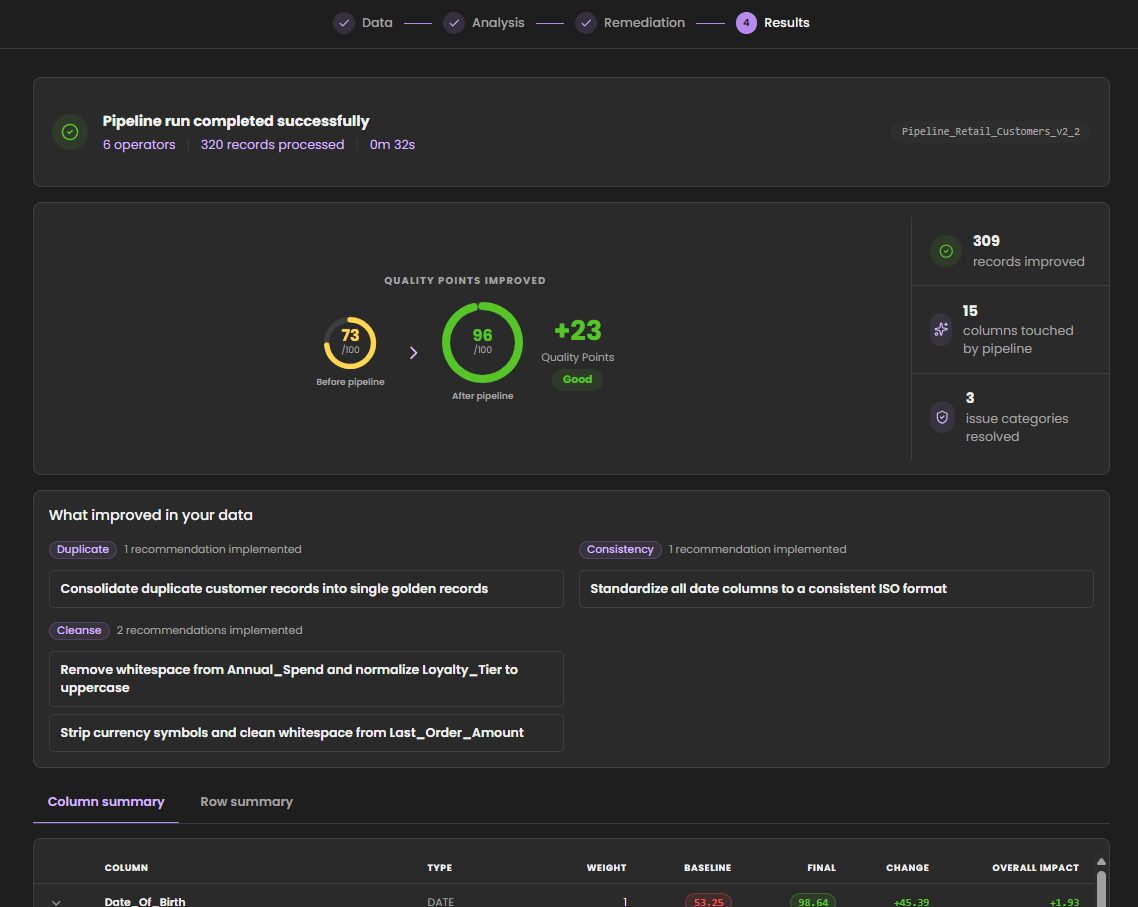
You can upload your own CSV file and try it for yourself, or use one of our sample files. You’ll be able to profile that dataset across multiple data quality components in minutes and see an AI-narrated data quality (DQ) score with remediation recommendations for flagged issues. For example, one of our sample files improved its data quality score from 73 to 96 in under five minutes. The score reflects how well the data meets quality standards.
The improvement came from standardizing dates and currency and consolidating duplicate records to create a single, trusted version of each record. That is the kind of fix that keeps orders in the retail example from being misread as they move between systems.
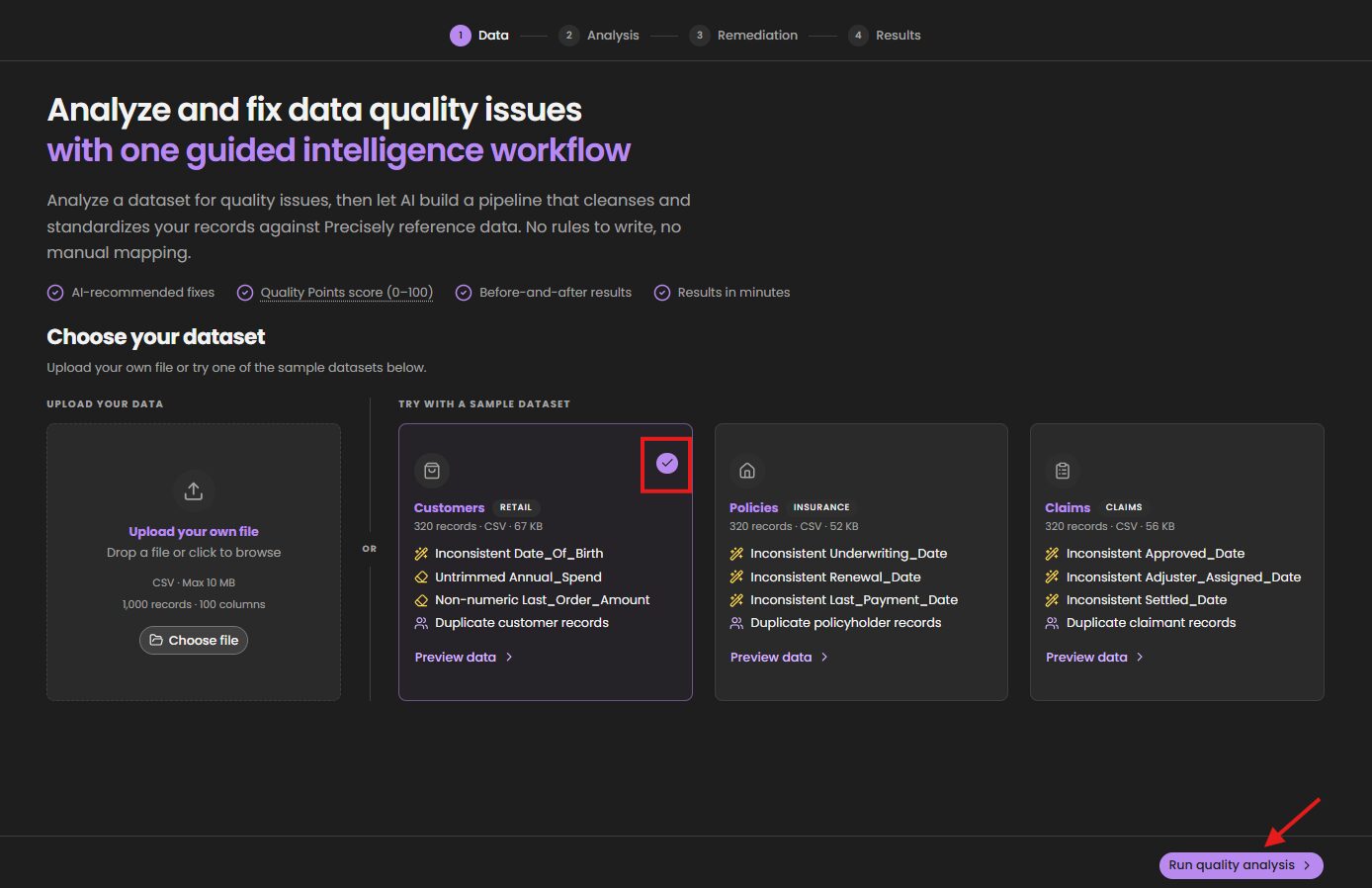
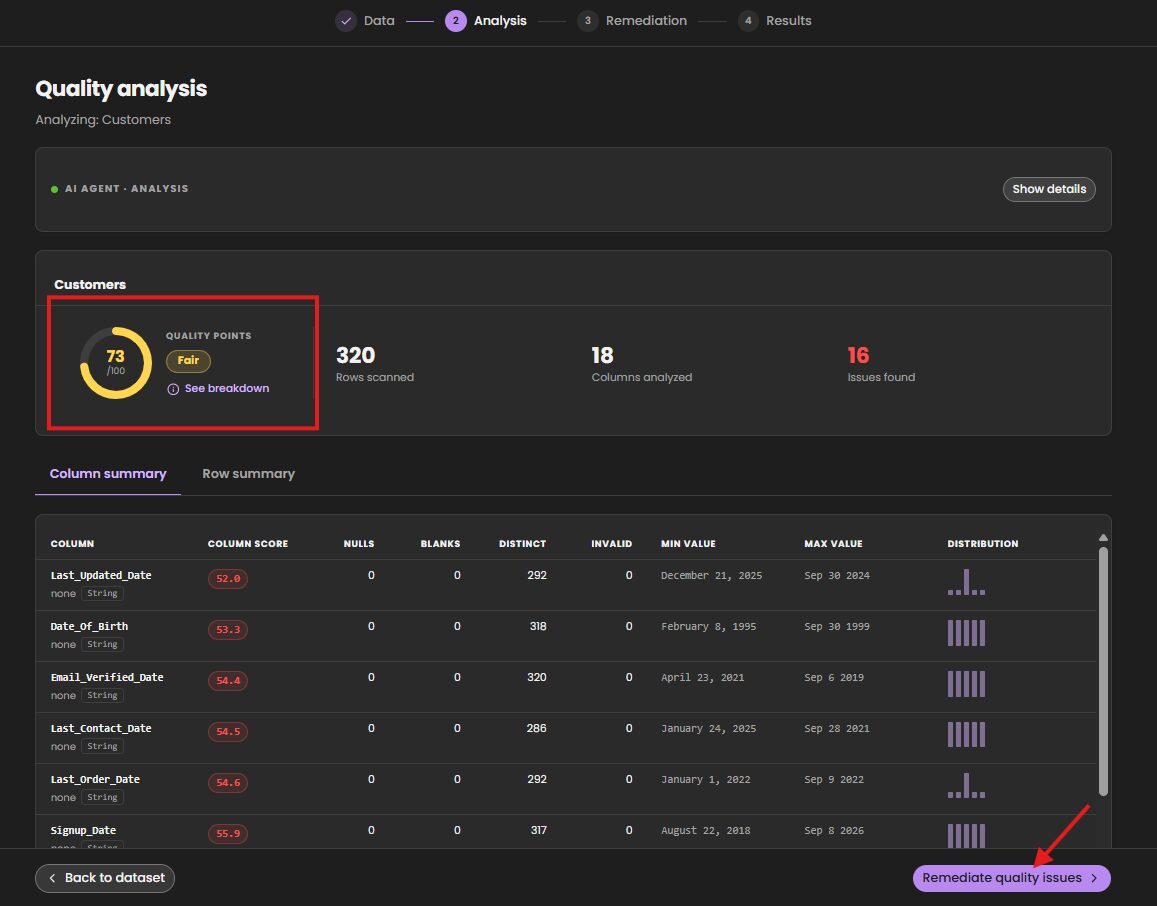
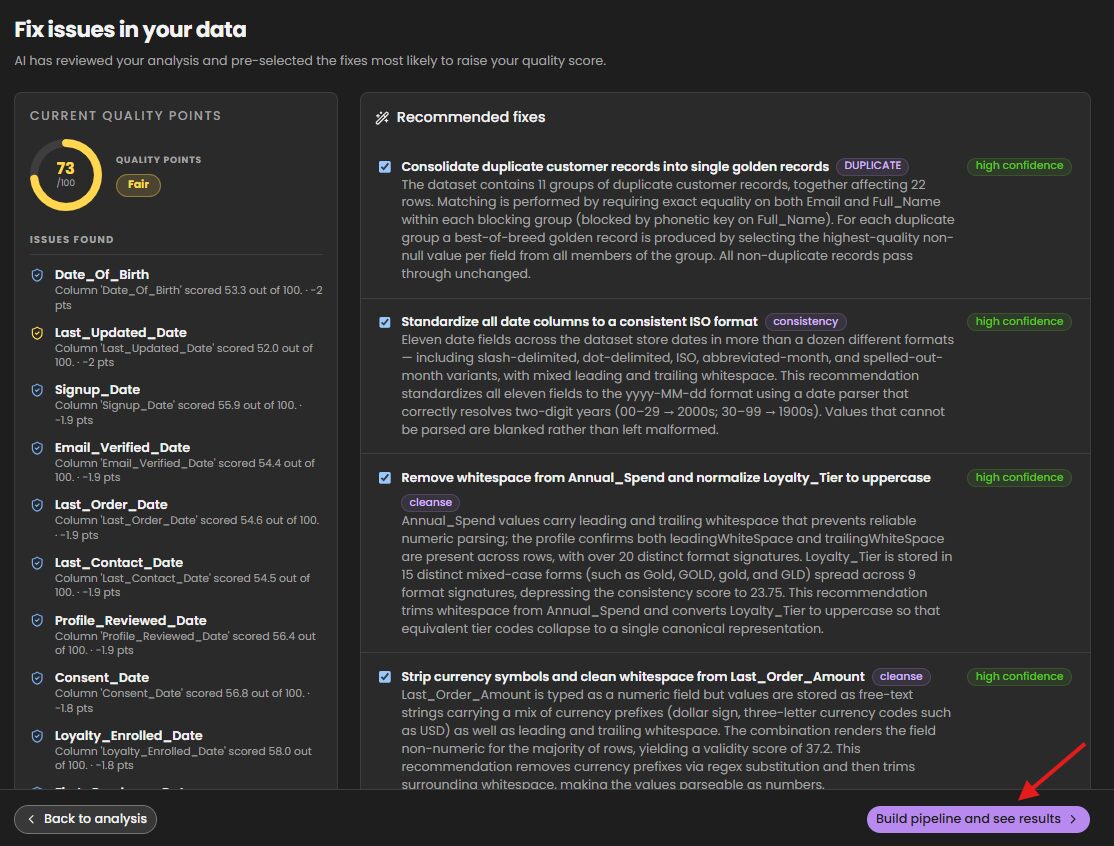
Here’s what this process looks like at a glance.
Step 1: Preview sample data and click Run quality analysis
Step 2: Review the AI agent’s analysis and click Remediate quality issues.
Step 3: Review recommended fixes, click Build pipeline, and see results.
Step 4: Watch the improvement in the quality score.
Reliable data is one of the four qualities of AI-ready data, which makes this a practical first app to try.
What can you learn from a property address with AI Studio?
An address tells you where a property is, but not what you need to know before deciding on it. The Property Analyzer app brings that context together by turning a US address into a property assessment that combines address quality, property intelligence, and risk information. For someone evaluating a property for insurance, lending, or investment, that gives them a stronger starting point for understanding the property and its potential risks.
The Real Estate Intelligence agent brings together Precisely capabilities such as geocoding, address verification, risk scoring, and property information behind the scenes. Instead of figuring out which individual data services to use, the user gets a finished, business-oriented assessment they can review and use to inform their next step.
How does data enrichment add context to your data?
A record that holds only an address or a customer name tells you where something is, but not what surrounds it or what risks it faces.
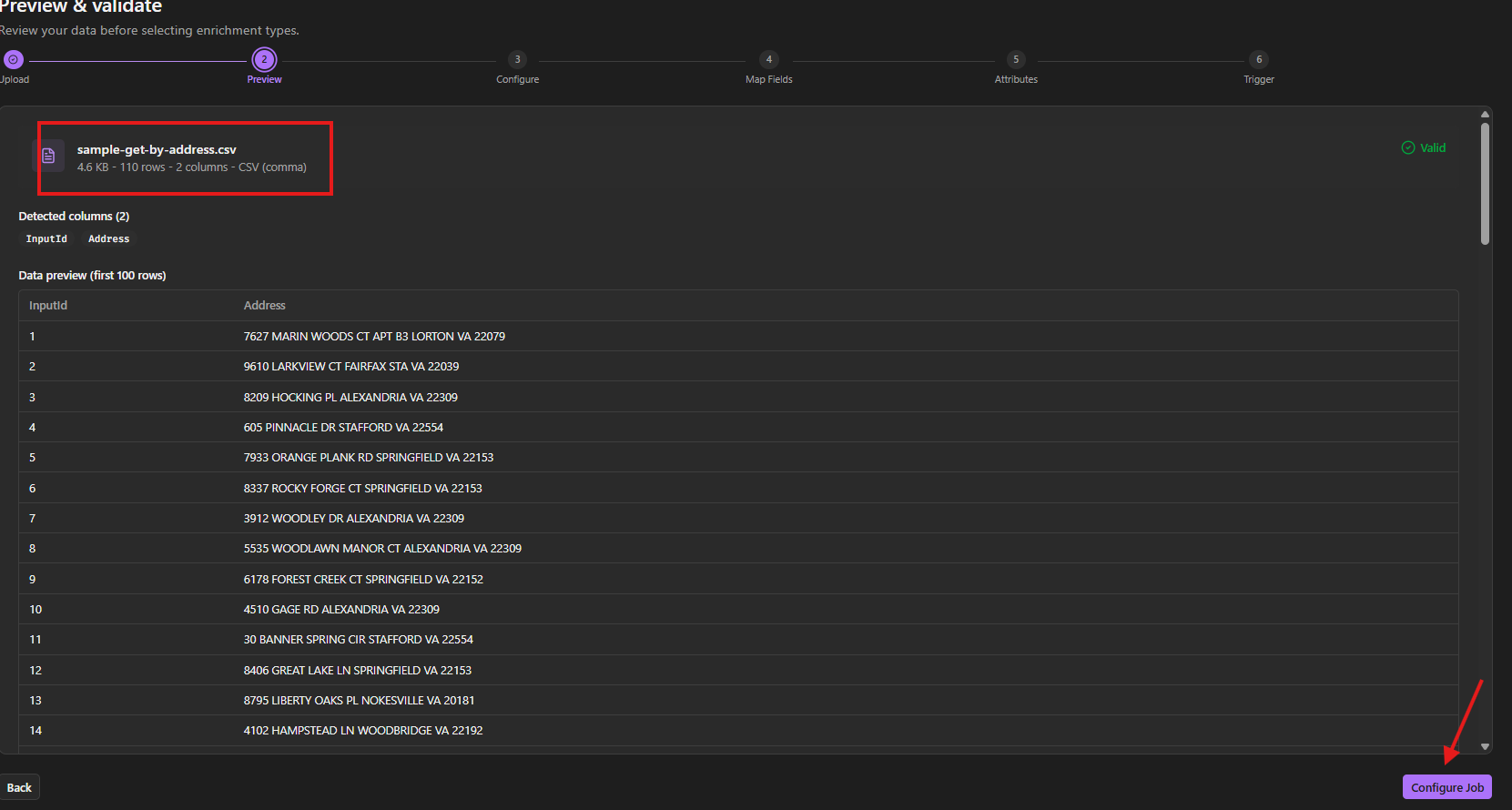
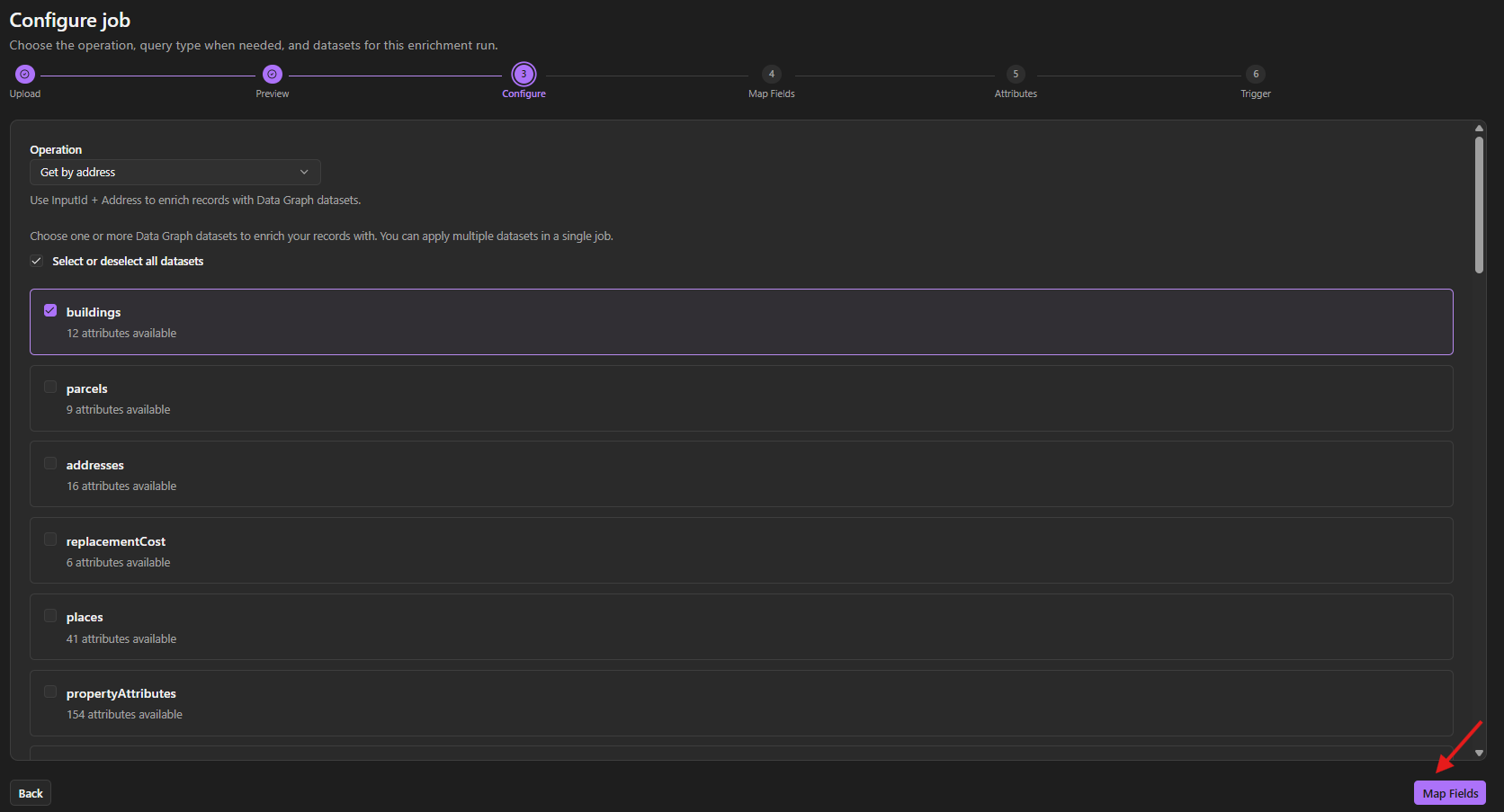
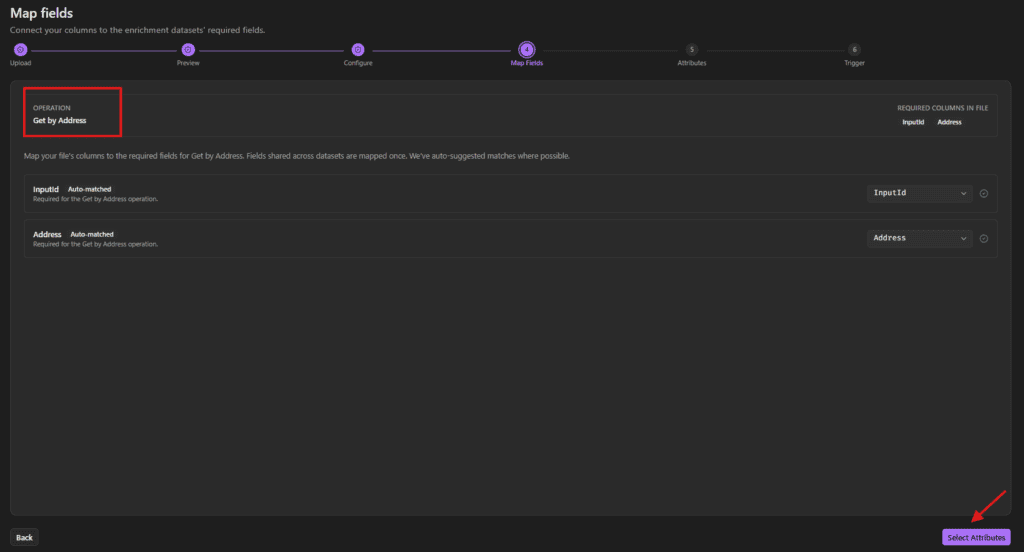
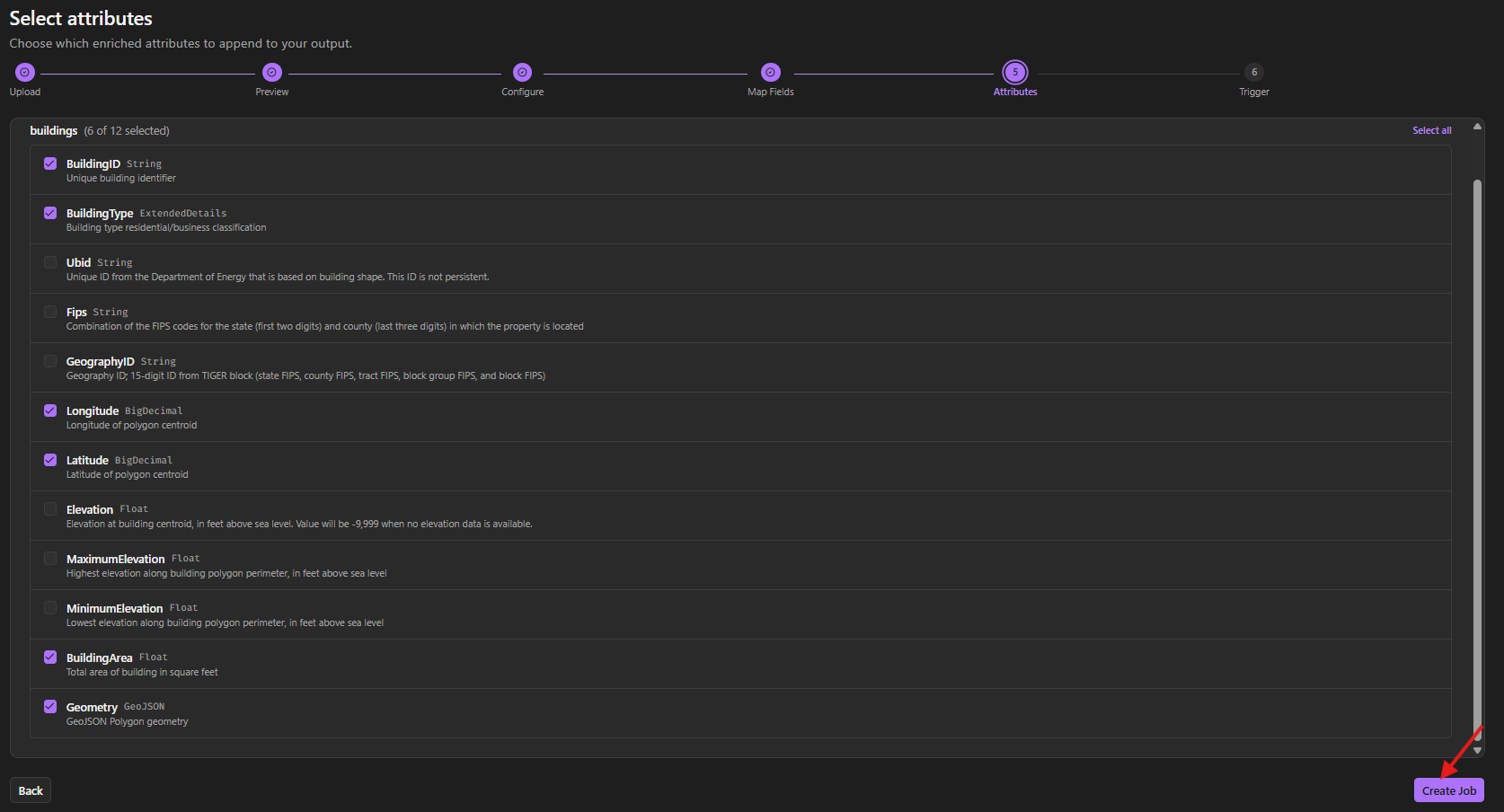
Data Graph Enrich lets you upload your own address or customer file, or use a sample file, and download it enriched with attributes from the Precisely Data Graph.
In the screenshots below, a basic address record gains building identifier and type, latitude, longitude, building area, and polygon geometry. That lets you see what enrichment would add to your own records before you build anything around it. Data enrichment is built into the Platform, and the added context completes the data, the fourth quality of AI-ready data.

If your team is exploring location intelligence or data enrichment, see what’s possible here.
How does MCP connect AI Studio to the tools you already use?
The Model Context Protocol (MCP) allows AI assistants and tools to access trusted capabilities and services through a consistent interface.
A connection on its own only moves data. It does not explain what the data means. Every asset in AI Studio is pre-connected through MCP and runs on Precisely datasets or data you are managing with Precisely capabilities, so your results are grounded in data an AI can interpret.
The Precisely-hosted MCP server provides a simplified way to connect supported environments, including Claude Desktop, GitHub Copilot CLI, VS Code Copilot, and Databricks. Setup is short: open the MCP setup section, download a bundle file, and install it in your tool using your API key and secret, which enables secure connectivity to Precisely services.
What this means for you: you no longer need to know where a feature lives to use it.
You can work with Precisely capabilities through natural language instead of hunting through the interface for the right page. Tasks that once required detailed product knowledge can start as a conversation.
Imagine creating governance assets, reviewing metadata, analyzing data quality, or exploring catalog information without opening the UI. You work directly in the AI experience you already know and prefer.
As enterprises move toward agentic AI experiences, the need for AI-ready data will only grow. AI Studio lowers the barrier to entry, speeds up experimentation, and helps organizations move from curiosity to action. Explore ready-made apps, agents, and skills in AI Studio with a free trial today.
Frequently asked questions
How long does it take to see results in Precisely AI Studio?
You can sign up for the free trial, launch an app, and start working on real data. In an internal demonstration, Data Quality Boost improved a sample file’s quality score from 73 to 96 in under five minutes, and connecting to MCP took less than five minutes from sign-up.
What is AI-ready data?
AI-ready data is visible, reliable, accountable, and complete. AI can find and understand it, rely on its quality, trace how it is used, and draw on the business and location context needed for sound decisions.
Can I use my own data in Data Quality Boost?
Yes. You can upload your own CSV files or experiment with sample datasets. The app profiles the data, highlights quality issues, recommends improvements, and lets you compare results before and after cleansing.
What is MCP, and how does it work with Precisely?
MCP lets AI assistants and tools access and use trusted capabilities and services through a consistent interface. The Precisely-hosted MCP server connects supported environments, including Claude Desktop, GitHub Copilot CLI, VS Code Copilot, and Databricks.
What can I do through MCP once I am connected?
You can work with Precisely capabilities through natural language instead of navigating the interface. Examples include creating governance assets, reviewing metadata, analyzing data quality, and exploring catalog information.